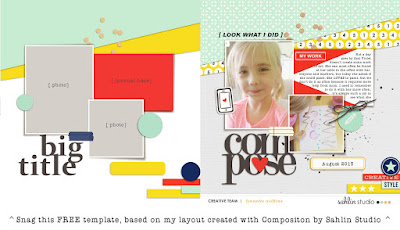
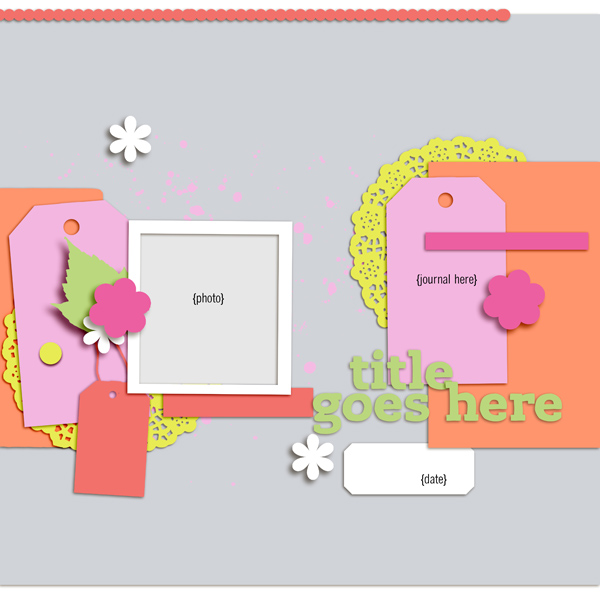
Hey there! It's been too long... both since I posted here, and since I offered a free template. I'm here remedy both of those things!
I've based this template off my most recent layout, created with the just-released Composition kit by Sahlin Studio and Memory Pockets Monthly Collection.
I love this design because you can incorporate several papers (including yummy patterns). I also like that you can use the photo and journaling spots as is, or mix them up to include just one photo, or three, or put the journaling in a different spot - totally flexible. I hope you like it too :) You can download it on my facebook page.
Thanks for stopping by. Happy scrapping!
Showing posts with label freebie. Show all posts
Friday, August 28, 2015
Sunday, November 23, 2014
New Layout + Template Freebie
I just finished up a page and - shocker - I decided to post it here right away. I've been dying to work with the Handmade kit since it came out, and as I was going through some photos I decided I wanted to scrap this picture of me + my kids taken on Mother's Day earlier this year. I think the two came together nicely!
Here's a look and a link to the beautiful Handmade kit I used for this layout:
And here's a link to a template, based on my layout. Feel free to download and enjoy! Happy scrapping!
| created with Handmade kit by Gennifer Bursett and Jen Allyson; Pistilli and QuickType Condensed fonts |
Here's a look and a link to the beautiful Handmade kit I used for this layout:
And here's a link to a template, based on my layout. Feel free to download and enjoy! Happy scrapping!
Saturday, June 28, 2014
New Layouts + a FREEBIE
It's been too long since I shared traditional layouts. Here's what I've been scrapping since my last non- Project Life post...
I love the Real Life in Pockets series that Just Jaimee and Mommyish are creating each month. I ended up making two layouts with their most recent edition, Are We There Yet?.
This layout is part of a larger album, which is mostly finished but I haven't posted the pages online. I scrapped most of them last year and now I'm just trying to finish them all so I can print a photo book.
This was for the June journaling challenge at My Scrapbook Art:
This page was made with Bright Side store collab kit - it's the free with purchase for June at Pixels and Company and I'm in love with it.
This layout was created nearly a month ago with the June Storyteller Collection by Just Jaimee. Since I took my sweet time in posting here, I decided to make a free template for you based on this page!
As you can see I had a lot of fun playing with the shadows to make them look a little more custom than usual. I used this tutorial since I scrapbook in Photoshop Elements (I'm using version 10). Hope you like it!
Thanks for stopping by!
I love the Real Life in Pockets series that Just Jaimee and Mommyish are creating each month. I ended up making two layouts with their most recent edition, Are We There Yet?.
| created with Real Life in Pockets: Are We There Yet? by Just Jaimee and Mommyish; Pockets no. 6 by Valorie Wibbens; Pea Diana font |
| created with Real Life in Pockets: Are We There Yet? by Just Jaimee and Mommyish; Lifelines no. 1 templates by creashens; Pea Kar Kar and KG Always a Good Time fonts |
This layout is part of a larger album, which is mostly finished but I haven't posted the pages online. I scrapped most of them last year and now I'm just trying to finish them all so I can print a photo book.
This was for the June journaling challenge at My Scrapbook Art:
| created with Hooray kit by Sabrina's Creations; Spaz alpha by creashens; Photo Flair - Candy by Jennifer Valencia; DK Wayang font |
This page was made with Bright Side store collab kit - it's the free with purchase for June at Pixels and Company and I'm in love with it.
| created with Bright Side collab kit by the Pixels and Company designers; Stars From Our Eyes font |
This layout was created nearly a month ago with the June Storyteller Collection by Just Jaimee. Since I took my sweet time in posting here, I decided to make a free template for you based on this page!
| created with 2014 June Storyteller Collection by Just Jaimee; arsenale white font |
As you can see I had a lot of fun playing with the shadows to make them look a little more custom than usual. I used this tutorial since I scrapbook in Photoshop Elements (I'm using version 10). Hope you like it!
Thanks for stopping by!
Tuesday, June 3, 2014
You + Me and a FREEBIE
I'm hosting the 3-Way Challenge over at Pixels and Company this week, which means I have a layout to share. I also created a freebie to go along with it- but first, the sample layout I created for the challenge. Just sweet moment of my daughter and I.
I've made a template based on this page - just click the image to download. Happy scrapping!
![]() |
| created with This Moment kit by Anita Designs |
I've made a template based on this page - just click the image to download. Happy scrapping!
Friday, May 16, 2014
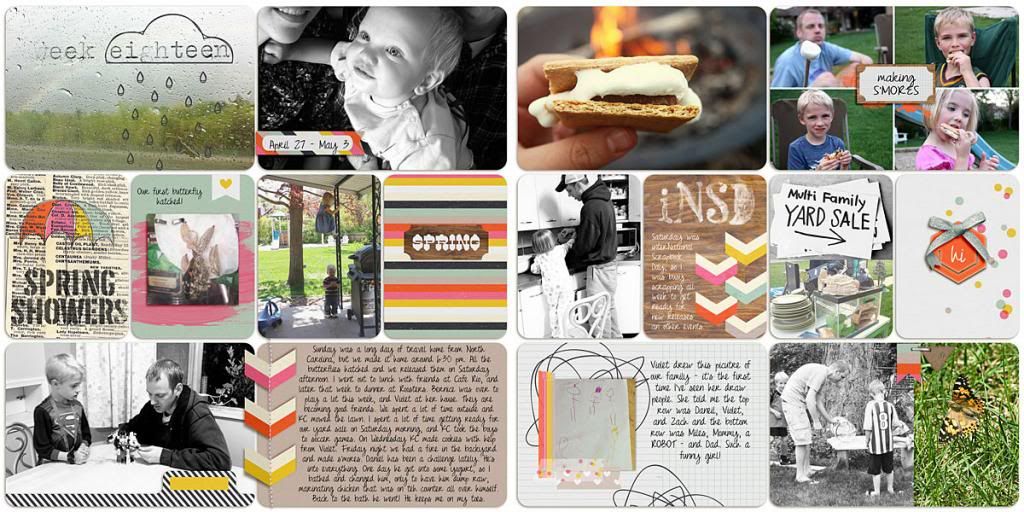
Project Life 2014: Week 18
Welcome to Week 18! Yep, still a week behind. But all is well. I'm still going pretty simple with my spreads, enjoying mixing black and white with color photos, and using the same template & font each week. The last couple of weeks I've been using some journal card collage templates to get more photos onto my spread. I really like the 4x6 ones from Designs by Lili, she has sets here, here, here and here.
{click image to view larger}
Also... this week I used products by the fabulous Allison Pennington. Her designs consistently blow me away - I'm a long-time fan! She's the current featured designer over at My Scrapbook Art. You can find her feature on the blog, plus pick up this colorful freebie on the MSA facebook page! Thanks for stopping by, and enjoy your weekend!
Saturday, May 3, 2014
Pixels & Company Creative Team Blog Hop
Hi scrappers! Welcome to my little corner of the Interwebs. I hope you're enjoying the big sale, freebies, contests, challenges and games P&Co is offering this weekend. If you haven't already, be sure to head over to the forum to check out the fun. I'm hosting a gallery tag game this weekend, with two prizes up for grabs! It's super easy and super fun.
Now on to the blog hop!
1. P&Co Blog - www.pixelsandcompany.com/blog
2. Lynnette - www.scrapping-is-life.blogspot.com <<< you are here
3. Amy - http://amykingsford.com
4. Jenn - http://stitchsnapsketch.com
5. Linda - http://www.inthemakingdesign.com/
6. Laura - http://itsallrosie.blogspot.com/
7. Barbara - http://barbarascre8iveescape.blogspot.com
8. Anna - http://scrapownia.blogspot.com/
9. Kelly - http://www.capturingandcreating.com/
10. Mandi - http://ryanmandi.blogspot.com/
11. Jen H -http://jenniferhignite.blogspot.com
12. Erin http://erintaylor718.blogspot.com
13. Jennifer E.- https://www.facebook.com/JensCre8tivity
14. Carey http://careyscrapper.blogspot.com/
15. Kat http://memories-that-matter.blogspot.com
16. Rachel https://www.facebook.com/pages/Rache...51159785045091
17. Nettie www.nettie-isms.blogspot.com
Final Stop P&Co Forum
I've created two journal cards using items from the fabulous Bermuda Triangle kit by the P&Co designers. It's amazing, just in case you were wondering:
Here are the journal cards I created:
Your next stop is Amy at http://amykingsford.com. Happy hopping, and Happy iNSD!
Now on to the blog hop!
1. P&Co Blog - www.pixelsandcompany.com/blog
2. Lynnette - www.scrapping-is-life.blogspot.com <<< you are here
3. Amy - http://amykingsford.com
4. Jenn - http://stitchsnapsketch.com
5. Linda - http://www.inthemakingdesign.com/
6. Laura - http://itsallrosie.blogspot.com/
7. Barbara - http://barbarascre8iveescape.blogspot.com
8. Anna - http://scrapownia.blogspot.com/
9. Kelly - http://www.capturingandcreating.com/
10. Mandi - http://ryanmandi.blogspot.com/
11. Jen H -http://jenniferhignite.blogspot.com
12. Erin http://erintaylor718.blogspot.com
13. Jennifer E.- https://www.facebook.com/JensCre8tivity
14. Carey http://careyscrapper.blogspot.com/
15. Kat http://memories-that-matter.blogspot.com
16. Rachel https://www.facebook.com/pages/Rache...51159785045091
17. Nettie www.nettie-isms.blogspot.com
Final Stop P&Co Forum
I've created two journal cards using items from the fabulous Bermuda Triangle kit by the P&Co designers. It's amazing, just in case you were wondering:
Here are the journal cards I created:
| click to download |
Your next stop is Amy at http://amykingsford.com. Happy hopping, and Happy iNSD!
Friday, May 2, 2014
May BYOC + a FREE template
Hi everyone! Are you ready for iNSD?? I swear, the party starts earlier each year... kinda like how the Christmas stuff comes out as soon as Halloween is over, LOL. But in this case, I don't mind at all! I've got grand scrapping (and shopping) plans, plus another freebie coming for you on Saturday right here on the ol' blog.
But first, I wanted to share my latest layout, as well as a free template based on that page. I've been thinking for a while now that it would be fun to make some templates to share here, so I'm finally doing it! I plan to continue this at random, just as a fun little way to give something back to this awesome community. My first template is based on this layout I created using the brand-spankin'-new May BYOC stuff - most of it from Just Jaimee, but I used a few other things as well. (See credits for full supply list).
And you can grab the template right here. I've included PSD and TIFF files. Enjoy! If you use it, I'd love to see your layout. Link me up!
I hope you have fun celebrating! See you soon!
But first, I wanted to share my latest layout, as well as a free template based on that page. I've been thinking for a while now that it would be fun to make some templates to share here, so I'm finally doing it! I plan to continue this at random, just as a fun little way to give something back to this awesome community. My first template is based on this layout I created using the brand-spankin'-new May BYOC stuff - most of it from Just Jaimee, but I used a few other things as well. (See credits for full supply list).
![]() |
created with Cerulean Bits, Juicy Bits Painted Alpha, Sticky Bits Word Labels by Just Jaimee; |
And you can grab the template right here. I've included PSD and TIFF files. Enjoy! If you use it, I'd love to see your layout. Link me up!
I hope you have fun celebrating! See you soon!
Monday, April 11, 2011
Easter Subway Art FREEBIE
I can't believe it's been more than a month since I've posted anything here! Life has been busy and I haven't been scrapping as much, although I do have several layouts I just haven't posted yet. I've also been talking Katrina Kennedy's Your Life Through The Lens photography class at Get it Scrapped!, which has been great but has taken some of my scrapping/blogging time.
I did want to quickly share something fun I made yesterday, this Easter subway art. I've been seeing subway art around on various crafting blogs, and it seemed like fun so I tried making one.

I like how it turned out. If you do too, you can grab your own right here. It's for an 8x10 frame. Enjoy!

xoxo,
I did want to quickly share something fun I made yesterday, this Easter subway art. I've been seeing subway art around on various crafting blogs, and it seemed like fun so I tried making one.

I like how it turned out. If you do too, you can grab your own right here. It's for an 8x10 frame. Enjoy!

xoxo,
Wednesday, October 6, 2010
Soccer Star + Freebie
*sigh*.... I just got on here to make this new post, when I saw my last post about the sale at Persnickety Prints and realized I totally forgot about it, so I missed it! Oh well, I hope someone saw it and was able to benefit from it. Anyway, onto the good stuff.
For my latest layout, I used the new "Blustery Fall" kit by SuzyQ Scraps. Although it's a fall themed kit, I didn't really have any fall pictures to scrapbook so I used it to make a page about my son playing soccer. I love finding an "unconventional" use for a kit. :)

The good news is you can pick up the add-on to this kit for free! Here's what you'll get:

You can find half at The Daily Scrapper, and the other half at SuzyQ Scraps new & improved site. Enjoy!
xoxo,
For my latest layout, I used the new "Blustery Fall" kit by SuzyQ Scraps. Although it's a fall themed kit, I didn't really have any fall pictures to scrapbook so I used it to make a page about my son playing soccer. I love finding an "unconventional" use for a kit. :)

The good news is you can pick up the add-on to this kit for free! Here's what you'll get:

You can find half at The Daily Scrapper, and the other half at SuzyQ Scraps new & improved site. Enjoy!
xoxo,
Thursday, August 26, 2010
Free Kit!
I know there are tons of digital scrapbooking freebies out there in digi land, but this one I really thought was worth sharing. Through the month of September, Digital Scrapbook Memories is offering this very cute "School Rules" kit for FREE:

You might recall this is the kit I used to make this paint bucket project. Once you pick up the kit, be sure to enter any layouts you create with it in the School Rules Challenge at Digital Scrapbook Memories. I plan on using it again next week as soon I send my Kindergartner on his way! ;)
xoxo,

You might recall this is the kit I used to make this paint bucket project. Once you pick up the kit, be sure to enter any layouts you create with it in the School Rules Challenge at Digital Scrapbook Memories. I plan on using it again next week as soon I send my Kindergartner on his way! ;)
xoxo,
Tuesday, May 25, 2010
Printing Your Pages
From time to time I get questions about printing here on my blog, so I thought I'd dedicate a post just to this subject. As you might already know, I print most of my layouts individually and then put them in 8x8 "page protector albums. But from time to time I like to make photo books for things like trip albums or my everyday life yearly albums. So I've broken it down into those two categories. But before I go on, let me direct you to these way more in-depth and informative posts on the subject at The Daily Digi:
Printing Photo Books
Printing Layouts
And now... here are my 2 cents:
Printing Layouts
As far as printing my layouts, I have tried a few different things with varying results. My two biggest complaints are 1) that sometimes the colors I see on my computer screen are not quite the colors I see in my prints, and 2) sometimes there is a little bit of cropping near the edges. In the past I have gone to my local brick and mortar copy store: Staples, Office Max, even Costco, to have my layouts printed. My experience varied, but overall I was pretty happy with how my pages turned out. I have even printed on both photo paper and cardstock, and although I like them both I lean a little more towards photo paper, which is pretty much the norm for printing scrapbook pages. It just has a nice quality to it. My personal preference is to use matte or lustre photo paper as opposed to glossy.
But most recently I have tried a couple of online places. First was Scrapping Simply. I really like their prices (even cheaper than any copy store) and they offer pick up at a location in the town my Mom lives in (in Utah County, FYI if you live there), so I just had her pick them up for me and I didn't have to pay any shipping. I was pretty happy with the quality of the prints; no cropping, but the colors weren't quite what I had hoped for. Next I tried Persnickety Prints, mainly because I had a coupon code. Their prices both for prints and shipping is comparable to to Simply Scrapping. I think I liked them best just because the colors were a little more accurate to what I see on my screen (still not perfect though) and the quality was great. Also, I found both these companies to be great when it came to cropping the edges. However, I would recommend trying out a few different printers until you find the one that matches your screen the closest. There are a lot of other places to consider as well - I recommend checking out The Daily Digi post I linked up above for a very complete list of printers. Also, both Simply Scrapping and Persnickety have some great freebies available. {Simply Scrapping Freebies}
{Persnickety Prints Freebies}
I've also added buttons for both these sites on my sidebar if you want to check them out.
Photo Books
Again, I haven't tried a whole lot of different companies when it comes to photo books. I have probably used Winkflash the most, just because the often run really good deals. And I am kind of cheap! I have never ordered a custom cover, I've just gone with the fabric cover. They do a good job, but sometimes there is a little bit of cropping near the edge, and maybe a little bit of a white border added to the top or bottom of the page.
Another company I recently tried is Heritage Makers. I have a friend who is a consultant for them, so I thought I'd give it a try. So far I have made these two books using their site:

The smaller one, a 5x5" book, is my Project 30 album. The larger, my 8x8" album, is my Ordinary Life book for 2009. They are really great quality, I really like the hard cover. And I love how you can customize the cover, spine, and back of these books.


Here's a look inside them:


As you might be able to tell, there is a little bit of white on the top and bottom of the pages. Although I created my layouts at exactly 8x8 and 5x5, for some reason they still didn't fit exactly in their template, which was kind of annoying. But in the end I find it doesn't really bother me when looking at my albums. Of course, this wouldn't be an issue if you just use their premade templates, but I like to create my own layouts. They are definitely more pricey than my Winkflash photo books, but much better quality. Another thing I loved is that the colors looked great.
Currently I am working on making photo books for my boys of their first year of life. They love to look at their baby pictures in our family scrapbooks, but I never made baby books for them so I am working on them now - hopefully I'll get them done before baby #3 arrives! I haven't decided for sure, but I think I will try Shutterfly for them. Again, a little more pricey than some sites, but I have heard nothing but good things.
I hope this has been somewhat helpful! Did I miss anything? If you have any other tips, or places you love to print, I'd love to hear them.
xoxo,
Printing Photo Books
Printing Layouts
And now... here are my 2 cents:
Printing Layouts
As far as printing my layouts, I have tried a few different things with varying results. My two biggest complaints are 1) that sometimes the colors I see on my computer screen are not quite the colors I see in my prints, and 2) sometimes there is a little bit of cropping near the edges. In the past I have gone to my local brick and mortar copy store: Staples, Office Max, even Costco, to have my layouts printed. My experience varied, but overall I was pretty happy with how my pages turned out. I have even printed on both photo paper and cardstock, and although I like them both I lean a little more towards photo paper, which is pretty much the norm for printing scrapbook pages. It just has a nice quality to it. My personal preference is to use matte or lustre photo paper as opposed to glossy.
But most recently I have tried a couple of online places. First was Scrapping Simply. I really like their prices (even cheaper than any copy store) and they offer pick up at a location in the town my Mom lives in (in Utah County, FYI if you live there), so I just had her pick them up for me and I didn't have to pay any shipping. I was pretty happy with the quality of the prints; no cropping, but the colors weren't quite what I had hoped for. Next I tried Persnickety Prints, mainly because I had a coupon code. Their prices both for prints and shipping is comparable to to Simply Scrapping. I think I liked them best just because the colors were a little more accurate to what I see on my screen (still not perfect though) and the quality was great. Also, I found both these companies to be great when it came to cropping the edges. However, I would recommend trying out a few different printers until you find the one that matches your screen the closest. There are a lot of other places to consider as well - I recommend checking out The Daily Digi post I linked up above for a very complete list of printers. Also, both Simply Scrapping and Persnickety have some great freebies available. {Simply Scrapping Freebies}
{Persnickety Prints Freebies}
I've also added buttons for both these sites on my sidebar if you want to check them out.
Photo Books
Again, I haven't tried a whole lot of different companies when it comes to photo books. I have probably used Winkflash the most, just because the often run really good deals. And I am kind of cheap! I have never ordered a custom cover, I've just gone with the fabric cover. They do a good job, but sometimes there is a little bit of cropping near the edge, and maybe a little bit of a white border added to the top or bottom of the page.
Another company I recently tried is Heritage Makers. I have a friend who is a consultant for them, so I thought I'd give it a try. So far I have made these two books using their site:
The smaller one, a 5x5" book, is my Project 30 album. The larger, my 8x8" album, is my Ordinary Life book for 2009. They are really great quality, I really like the hard cover. And I love how you can customize the cover, spine, and back of these books.
Here's a look inside them:
As you might be able to tell, there is a little bit of white on the top and bottom of the pages. Although I created my layouts at exactly 8x8 and 5x5, for some reason they still didn't fit exactly in their template, which was kind of annoying. But in the end I find it doesn't really bother me when looking at my albums. Of course, this wouldn't be an issue if you just use their premade templates, but I like to create my own layouts. They are definitely more pricey than my Winkflash photo books, but much better quality. Another thing I loved is that the colors looked great.
Currently I am working on making photo books for my boys of their first year of life. They love to look at their baby pictures in our family scrapbooks, but I never made baby books for them so I am working on them now - hopefully I'll get them done before baby #3 arrives! I haven't decided for sure, but I think I will try Shutterfly for them. Again, a little more pricey than some sites, but I have heard nothing but good things.
I hope this has been somewhat helpful! Did I miss anything? If you have any other tips, or places you love to print, I'd love to hear them.
xoxo,
Thursday, April 15, 2010
Freebie Alert!
I know Heather because we are on a couple of the same creative teams. Not only is she an awesome scrapper, but she has just designed her first kit, "Daisy Doodles", which she is giving away for free on her blog. Just look at this cute layout I made with it:

{everything from "Daisy Doodles" freebie kit by HD Creations; "Pea Times New Camileon" font}
I love the spring colors - so perfect for this photo of my boys in their Sunday best - and all the little doodles are adorable. Go pick it up, and don't forget to leave her some love!
xoxo,

{everything from "Daisy Doodles" freebie kit by HD Creations; "Pea Times New Camileon" font}
I love the spring colors - so perfect for this photo of my boys in their Sunday best - and all the little doodles are adorable. Go pick it up, and don't forget to leave her some love!
xoxo,
Tuesday, December 1, 2009
Christmas Countdown Freebie
Holy cow, I can't believe it's December. Seriously, I think November went by faster than any month this year! I'm certainly not ready for Christmas yet, but I'm working on it. The other day I got the great idea to make some numbers for a countdown I'm making... I thought they turned out kinda cute so I'm sharing them here. Here's what they look like:

I just printed them on cardstock and cut them out using a scallop circle punch. Unfortunately that's as far as I've gotten - like I said, I'm not really ready for December to be here yet! - but as soon as I get my whole project finished I'll be back to share photos.


You could also just use the files on digital layouts. They can easily be recolored in photoshop to match your specific project. I've included the individual .png files, as well as an 8.5x11 sheet that makes it easy to print.
xoxo,

I just printed them on cardstock and cut them out using a scallop circle punch. Unfortunately that's as far as I've gotten - like I said, I'm not really ready for December to be here yet! - but as soon as I get my whole project finished I'll be back to share photos.


You could also just use the files on digital layouts. They can easily be recolored in photoshop to match your specific project. I've included the individual .png files, as well as an 8.5x11 sheet that makes it easy to print.
Go here to download your own set of Christmas countdown numbers.
And please leave a comment if you download - thanks!
xoxo,
Friday, October 17, 2008
All Aboard!
***Edited Saturday, October 18: If you tried to download this previously but only got .jpeg files, please try again... I fixed it and if you click the link again you will now get the .png files. I'm sorry everyone!***
All aboard the PARTY train! Welcome to my little corner of the scrapbook world! You probably arrived here from Tricia's blog (a link in case you need to backtrack ;) Here are my quickpages for the album:

Now just head on over to Karen's blog to keep it movin' and get the next download! And join us at the forum for all the other FUN party stuff! Also - everything in the shop is 30% off, and you get this adorable kit for FREE when you spend $10:

Oh - and did you see Kelley's new collab kit w/ Rachel Young? Can't wait to play with this...

AND... if you pick it up this weekend, you get these mini tag album QP's FREE!

Thanks for partying with us!
xoxo,
All aboard the PARTY train! Welcome to my little corner of the scrapbook world! You probably arrived here from Tricia's blog (a link in case you need to backtrack ;) Here are my quickpages for the album:

Now just head on over to Karen's blog to keep it movin' and get the next download! And join us at the forum for all the other FUN party stuff! Also - everything in the shop is 30% off, and you get this adorable kit for FREE when you spend $10:

Oh - and did you see Kelley's new collab kit w/ Rachel Young? Can't wait to play with this...

AND... if you pick it up this weekend, you get these mini tag album QP's FREE!

Thanks for partying with us!
xoxo,
Subscribe to:
Posts (Atom)